How to Turn a Phone Photo into a Professional Clothing Photo
Phone photos can become professional fashion images with AI. Learn how to prepare your shot, what the tool actually does, and what to expect from the final result.
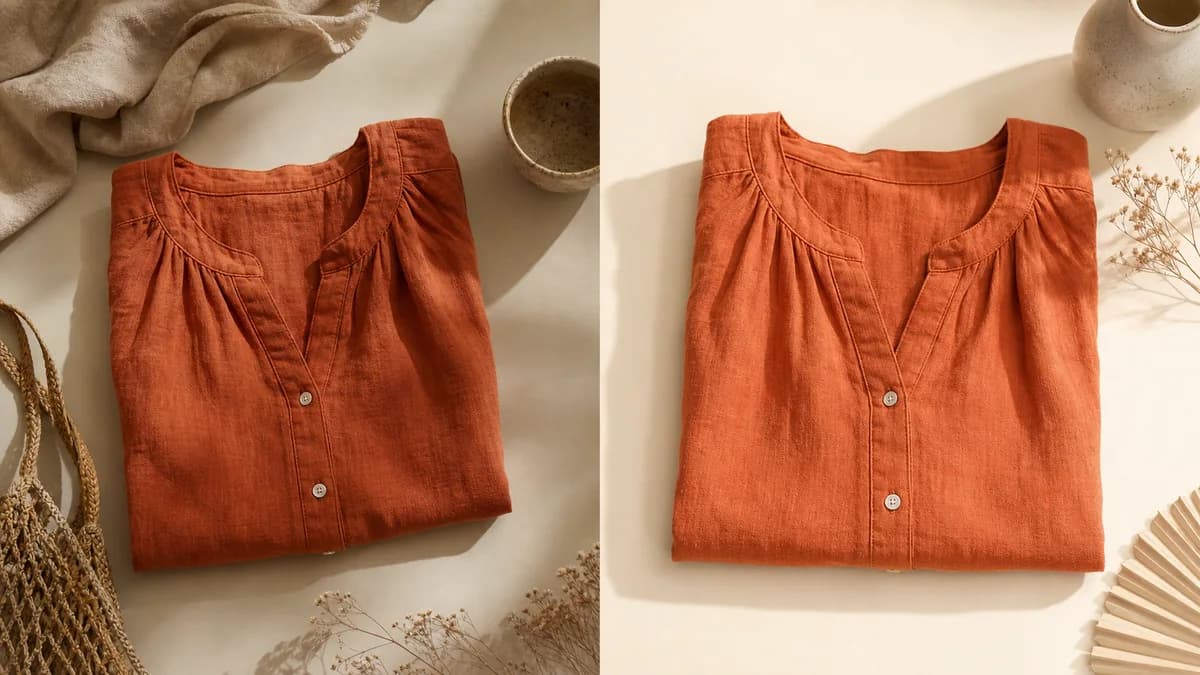
Yes, a phone photo can become a professional fashion image. The AI that places clothing on a virtual model does not need a DSLR camera, studio, or professional lighting to deliver a catalog-quality image. What it needs is a clean input photo where the garment is visible, well lit, and not competing with a cluttered background. The tool handles the rest.
The difference between a good result and a poor one starts before you open any app. This article explains what to prepare, what the AI actually does, and what to expect from the final output.
What the AI does and what it does not
The tool receives your garment photo (on a hanger, mannequin, flat lay, or from your supplier catalog) and generates a new image with a virtual model, a selected pose, and a chosen background. It preserves the print, texture, and drape of the clothing. It does not fix lighting errors, does not erase wrinkles caused by poor positioning, and does not reconstruct details that are not visible in the original photo.
If the original photo is blurry, the result will be blurry. If the background has too many objects and the garment gets lost in the scene, the automatic crop loses quality. The AI amplifies what you gave it to work with.
What changes after the AI
| Aspect | Original photo (phone) | Final photo (with AI) |
|---|---|---|
| Model | Hanger or mannequin | Virtual model |
| Background | Home or store environment | Clean studio or lifestyle |
| Lighting | Variable | Uniform and professional |
| Overall look | Amateur | Brand catalog |
| Production cost | Near zero | From US$ 0.50/photo |
| Production time | Immediate | 2 to 5 minutes per photo |
The result is a photo ready for marketplace listings, Instagram, and your own store.
How to prepare your phone photo for the AI
The quality of the input photo determines the quality of the result. These four points make the biggest difference:
Natural light near a window. Place the garment close to a window with diffused light (not direct sun hitting the fabric). Natural light distributes evenly and shows fabric texture accurately. Avoid photographing at night with only artificial light: the color temperature shifts and the AI reproduces that distortion in the final image.
Clean, distraction-free background. White wall, neutral sheet, or a plain door with nothing around it. You do not need an infinity studio backdrop. The goal is for the garment to stand out clearly so the automatic crop works well.
Ironed and properly positioned clothing. A wrinkled shirt on a hanger will appear wrinkled in the final result. Iron the garment, adjust the drape, and if you use a hanger, choose one that shows the garment's silhouette without distorting the shoulders.
Stable camera. Rest the phone on something or use a small tripod. Camera shake creates blur in fine details, especially on fabrics with thin prints or embroidery.
For a more detailed setup guide, the article how to photograph clothes for AI walks through the complete configuration step by step.
The process with VestiAI
The workflow has four steps:
- You upload the garment photo (JPEG or PNG, taken with your phone or from your supplier's catalog).
- You choose the virtual model: gender, skin tone, age range, pose style.
- You choose the background: white studio, urban lifestyle, neutral setting.
- The photo is ready in 2 to 5 minutes.
Each generated photo uses 1 credit. The Basic plan has 80 credits per month (US$ 39.90). To test without a credit card, the free plan gives you 5 credits. No installation required; it works in any browser on your phone or computer.
VestiAI has models with different skin tones, heights, and body types. If you want to maintain the same model throughout a collection to build visual brand identity, the Brand DNA feature lets you lock in a model identity. If you want customers to visualize the garment on themselves, the Magic Fitting Room does that directly on the product page.
When results are good and when they are not
The AI handles solid-color garments, prints, textured fabrics like knitwear or denim, and pieces with embroidery or medium-to-high contrast prints very well. The drape stays faithful to the input photo.
Garments that need extra attention:
- Sheer fabrics. Voile, tulle, and organza need a very clean background so the automatic crop does not confuse the fabric with the environment.
- Very small 3D details. Fine embroidery smaller than 3 mm in the input photo may lose definition in the generated image.
- Very voluminous pieces. Full-skirt or ball-gown dresses look better when the input photo clearly shows the volume, rather than compressing the garment against a flat surface.
If your input photo has a lighting problem, fix it before sending to the AI. No tool corrects a bad input photo.
What it costs compared to a traditional photo shoot
A professional fashion shoot in the US averages several hundred to over a thousand dollars per session, depending on the photographer, model, and studio. With VestiAI on the Basic plan, the cost is under US$ 0.50 per photo.
For a store launching 40 pieces per month, the annual difference adds up fast. The full cost breakdown with volume tables is in the article photo shoot cost vs AI: a real comparison.
Practical examples by store type
Mid-volume fashion store
A store launching 20 to 40 pieces per week spends significant time on photography production. Switching to an AI workflow changes that: photograph on a hanger with a phone (5 minutes per piece), batch upload to VestiAI, select a default model and background, download and publish. A full week of launches is ready in a single day.
A phone photo with good lighting and a clean background reaches the same visual result as a studio photo once the AI adds the virtual model. The end customer sees no difference.
Secondhand and vintage resale
Thrift stores face the challenge of one-of-a-kind pieces: scheduling a shoot for every item is not practical. AI solves this because each piece can be photographed individually with a phone and processed in minutes. Platforms like Depop, Poshmark, Vinted, and eBay reward listings with clean, consistent photos. AI makes that consistency achievable without ongoing production costs.
New or small brand
For a brand just starting out, photography production is one of the first serious cost barriers. With AI, the investment drops to the monthly plan cost, with no photographer, model, or studio to hire. The 5 free credits let you test before any financial commitment.
Checklist before uploading your photo to the AI
Run through this list for every photo before upload:
- [ ] Garment ironed and free of unnecessary wrinkles
- [ ] Clean background (wall, neutral fabric, or plain door)
- [ ] Even lighting, no hard shadow falling across the garment
- [ ] Garment centered and fully in frame
- [ ] Camera stable (no blur)
- [ ] Print or texture visible with clarity
- [ ] No flash reflection or window glare on the fabric
With these points covered, the AI has enough material to preserve the garment's details in the generated image.
Technical notes on phone cameras and file formats
VestiAI accepts JPEG and PNG files. For resolution, any current smartphone with a 12 MP or higher rear camera is more than sufficient. What matters more than megapixels is sharpness and lighting.
Always use the main rear camera, not the front-facing selfie camera. The main camera has a larger aperture, captures more fabric detail, and has less lens distortion. The selfie camera is typically lower resolution and introduces noticeable warping at close range.
iPhone 12 and later, Samsung Galaxy S21 and later, and Google Pixel 6 and later all deliver quality well above what is needed. Mid-range phones like Motorola's Moto G series also work well as long as the lighting is good.
Frequently asked questions
Does a supplier catalog photo work?
Yes, as long as the photo shows the garment clearly. Supplier photos on a mannequin with a neutral background usually work well and save you the work of photographing the piece yourself.
Are AI-generated photos accepted on marketplaces?
Depop, Poshmark, eBay, and most major platforms accept AI-generated product photos as long as the garment is represented accurately and the background is white or neutral. The main image cannot have overlaid text. Check the full criteria in the article fashion ecommerce photos that convert.
Can I generate the same piece on different models?
Yes. Each generation uses 1 credit. You can generate the same garment on different models to test which works best for your audience, with no extra production cost.
Can I generate a fabric detail or close-up photo?
The main workflow generates the full garment photo on a model. For detail shots, photograph the fabric, button, or finish directly with your phone (close-up) and publish those alongside the AI-generated images in your product gallery.
The free plan gives you 5 credits with no credit card required. Create a free account and see the result with your own garment in under 5 minutes.
Related Articles
AI in Fashion 2026: Real Trends and Opportunities
Which AI tools for fashion already work in 2026 for small stores, what is still hype, and how to start without spending much.
Read article
AI model photos for secondhand resale listings
How to use AI to create model photos for secondhand clothing without a photo shoot. What works, what doesn't, and how to handle worn items honestly.
Read article
Fashion Ecommerce Photos: Step-by-Step Production Guide
How to produce fashion ecommerce photos from scratch without expensive equipment. Lighting, angles by garment type, basic editing, and how to use AI to scale.
Read article